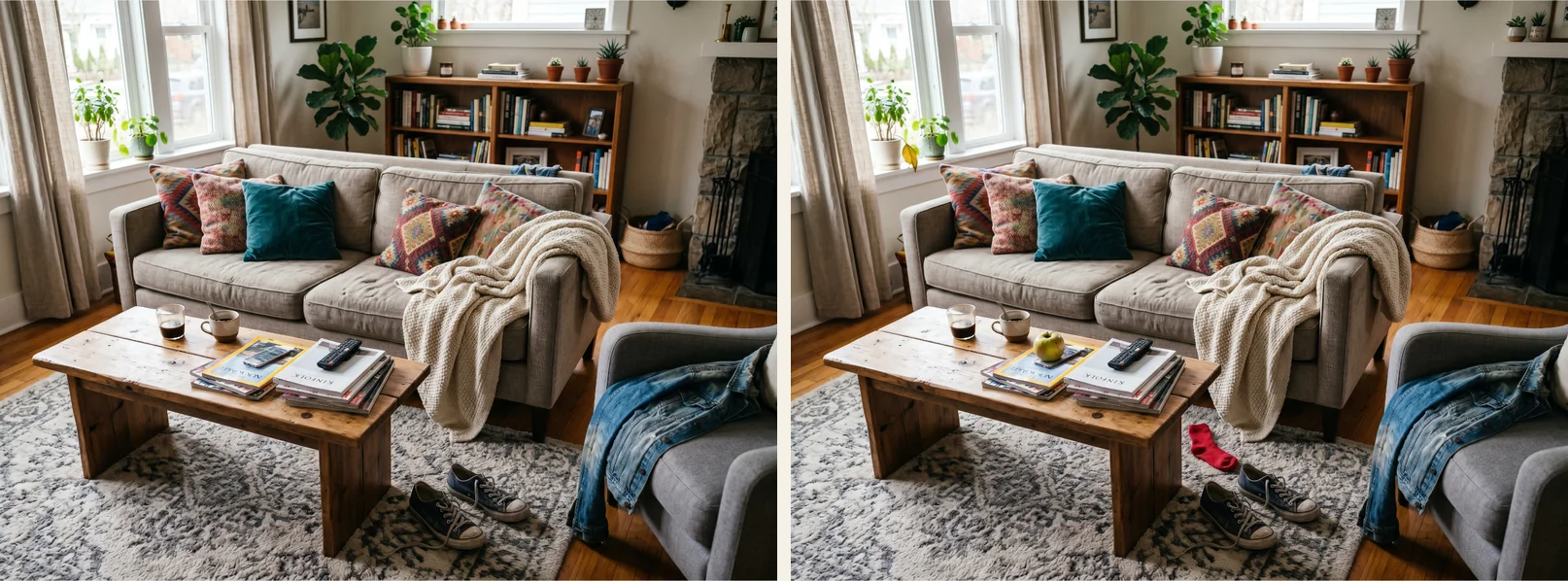
Most people play this game the same way. Eyes jump back and forth between the two pictures, and you hope something pops out. That's fine for the first two or three differences. It's the last one where you end up staring at the screen for five minutes, getting slightly annoyed.
Every official level gets played by us before it goes live, so we've spent a ridiculous amount of time looking at nearly identical pictures. Somewhere along the way we picked up a few habits. None of them are tricks. They just work with the way your eyes work instead of against them.
1. Don't search yet
Before you look for anything, look at the left picture as a whole for a few seconds. Then the right one. Don't focus on anything in particular.
It sounds too simple, but big changes often jump out right there. A missing chair, a jacket in a different color. Your brain is surprisingly good at noticing when two scenes don't match overall. It's much worse at small details when you're scanning in a hurry.
2. Split the picture up
Once the obvious ones are gone, random searching gets expensive. Split the picture into a grid in your head, thirds or quarters, and compare one piece at a time. Top left against top left. Then the next one.
Finish each piece before moving on. It feels slow, but it stops the most common mistake, which is checking the same interesting spot five times while never really looking at the dull corner where the last difference is.
3. Compare small things
You can only hold about three or four objects in visual short-term memory at once. If you look at a whole bookshelf on the left and then the whole bookshelf on the right, most of the details are gone by the time your eyes get there.
So pick one cushion. One plant. One window. Compare that, then the thing next to it. Lots of small comparisons beat a few big ones every time.
4. Count
How many books are on the table? How many birds in the sky? How many buttons on the jacket? Counting turns a vague feeling into a number, and numbers either match or they don't. This works really well in busy scenes, where one extra flower in a flower bed would never stand out visually.
5. Check the edges
Your attention goes to the middle of a picture and to anything that looks important: people, faces, animals, bright things. Puzzle makers know that. The edges of the frame are a classic hiding place. The top of a shelf that's half cut off, a strip of floor, the corner of the ceiling.
When you're stuck on the last one, trace all the way around the outside of both pictures once.
6. Look at the gaps
We see the world as things. A cup, a cat, a lamp. But differences can also be in the space between things: a shadow that's gone, an empty spot on a shelf, a gap in a fence. Try looking at the shapes of the empty areas instead of the objects. It feels strange at first, but it's the best way we know to find removed objects, which are the hardest ones.
7. Ask one question at a time
Almost every difference is one of a few kinds. Something was added or removed. Something changed color, size, or shape. Something moved, or was swapped for something else.
When you're stuck, go through that list on purpose. One pass looking only for color. One pass looking only for missing things. "Is anything different?" is too vague a question for your brain, and your eyes start wandering.
8. Zoom
On a phone, a small object can shrink to a handful of pixels. You can pinch to zoom on touch screens or use the mouse wheel on a computer, up to five times. Zooming into a crowded area and going through it bit by bit is often faster than squinting at the whole picture.
9. Take a break
After staring at the same scene for a while, you start seeing what you expect to be there instead of what's actually there. That's related to change blindness, and it's why a difference can be invisible for two minutes and then completely obvious once you come back.
Look away for half a minute. The level timer pauses when you switch to another app or tab, so it doesn't cost you anything.
10. Save hints for the last one
You have three hints, and a used one comes back after five minutes. A hint shows you one difference, not all of them. We'd save them for the very last difference, after you've gone through the zones properly. Using one early is tempting, but then you skip the fun part and still have to find everything else.
By the way, stars depend on how fast you find each difference compared to other players, and the clock keeps running while you think about using a hint. The details are in how stars and the leaderboard work.
Trying it on a real level
This is level 1 of our Messy rooms pack. Five differences. If you want to try it first, open the pack from the home page before you scroll any further.
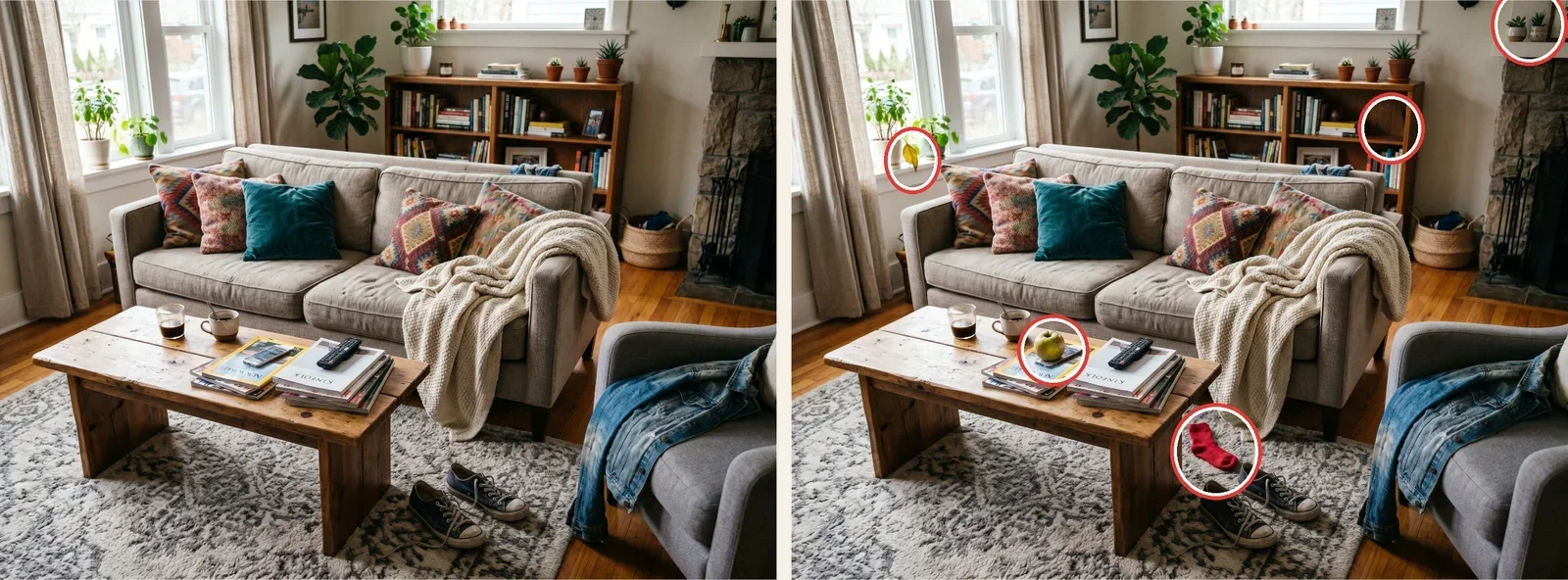
The red sock on the rug is probably the first one you found. Something added, in a strong color, on a calm surface, so it shows up during the first relaxed look. The apple on the magazines is also added, but the table is already busy, so it takes a moment longer.
The yellow leaf on the windowsill plant is a small color change right at the left edge. The missing picture frame on the bookshelf is a removed object. You find it by noticing the gap on the shelf, not by seeing something. And on the mantel in the top right corner, a brass candlestick and a glass jar turned into two little potted plants. It's right at the edge of the frame, which is where people stop looking.
Where to practice
Cartoon is a good warm-up, with clear shapes and bright colors. Messy rooms is great for practicing zones, because there's so much stuff everywhere. And 3 hard ones is exactly what it says: three differences per level, all well hidden. Save that one for when the others start feeling easy.
Don't try all ten at once. Pick one, use it for a few levels, then add the next. After a while, splitting the picture up and counting things just happens on its own.